SEO
How to Rank Higher on Google: A Small Business Guide
How to rank higher on Google, step by step: choose the right searches, improve your pages, fix technical problems, earn trust and measure what works.
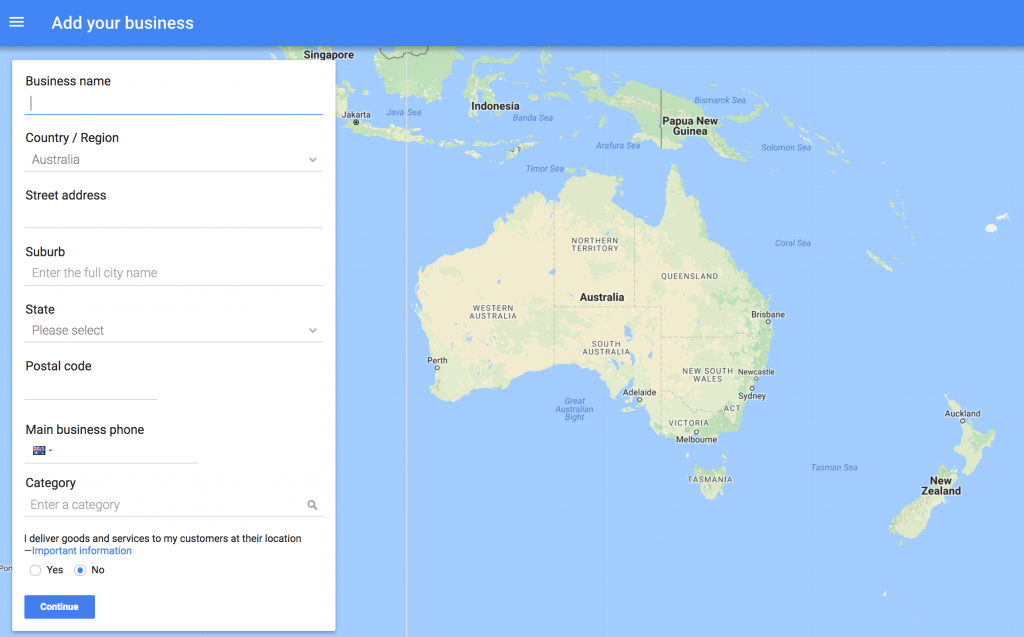
Here's how to add business to Google: create a free Google Business Profile at google.com/business, enter your business name and category, add your address or service areas, your phone number and website, then verify that you own the business. Once Google verifies it, your business can appear in Google Search and on Google Maps. The whole process is free and usually takes a few days, most of it waiting for verification.
You add your business to Google by creating a Google Business Profile (it used to be called Google My Business). It's the listing that shows your hours, phone number, reviews and photos when someone searches your business name or a service near them.
Before you start, have these ready:
Adding your business to Google Maps happens through the same Business Profile. Once your profile is verified, your business appears on Google Maps automatically. You can also start from the Google Maps app: tap your profile picture, then "Add your business", and follow the same steps.
If you only serve customers at their location, Google can hide your address and show a service area instead. Your business still appears in Maps searches in those areas.
Creating the profile takes about 15 minutes. Verification can happen straight away, take a few days, or longer if Google asks for a postcard or a video review. After verification, changes can take a few days to show. If your verification is stuck, check that your business name, address and category match your signage and website exactly.
Many of the businesses we talk to in Mildura and across Sunraysia already have a Google listing they didn't create. Google sometimes builds one from public information, and a customer may have added the business to Maps. In that case, claim the existing listing rather than creating a second one, because duplicates confuse Google and split your reviews.
The other common problem is a profile created by a past employee or web designer who has since moved on, leaving nobody able to log in. If that's you, Google lets you request ownership from the profile's page. Our Google Business Profile optimisation service sets up and verifies profiles (set-up is $500 + GST), and sorts out ownership problems like these.
Many owners search "how to get my business on Google", but getting listed is only step one. To show up for more searches:
Our guide to optimising your Google Business Profile covers each of these in detail, and our article on what local SEO is explains how your profile and website work together. Our SEO services cover the website side.
Yes. Creating and managing a Google Business Profile is free. Be wary of calls claiming to be from Google that ask for payment to list or verify your business: Google doesn't charge for Business Profiles.
Choose the option that you deliver goods and services to customers, then list your service areas instead of an address. You'll still need to verify the business, but your address won't show publicly.
Search your business name on Google or Maps, open the listing and choose "Claim this business" or "Own this business?". Follow the steps to verify. If someone else already manages it, you can request access.
Yes. Most home-based businesses set themselves up as service-area businesses and hide their home address. If customers do visit your home, you can show the address.
New profiles can take a few days to appear, and they show for your business name first. Showing up for broader searches like "electrician near me" depends on your categories, details, reviews and distance from the searcher.
Want help getting listed properly? Contact Rock Solid Marketing and we'll set up your profile with you.
A marketing team that has helped businesses across Sunraysia and the Mallee since 2017, from our office on Deakin Avenue in Mildura.
Keep reading
How to rank higher on Google, step by step: choose the right searches, improve your pages, fix technical problems, earn trust and measure what works.
A free SEO checklist for new and existing websites, with technical, on-page, content and local checks, plus how to check your SEO with free tools.
What is schema markup, what is it used for, does it help SEO, and how do you add it? A plain English guide to structured data for small business websites.

Let’s start by scheduling a free discovery call so we can get to know each other and see if we’re a good fit for your marketing needs.